Workplace Reservation
for Reading Rooms.

Easily reserve reading room spaces via App

How it works

Choose day, time and duration...

Find your favorite table...

and reserve it!

Check-in by scanning the QR code or entering the PIN at the desk

Pauses are also possible

Stay up to date with Live Activities

Check out when leaving, freeing up the table for others.

Completely Digital Workflow

The Three Components of Reserio

Person holding a smartphone with a seat reservation app in a modern open office or library building.

Smartphone App

for easy reservation

Split view of a table check-in setup: a QR code labeled “Tisch 012” on the left and a digital table sign with an app check-in prompt on the right.

QR Code or ePaper at the table

for easy check-in

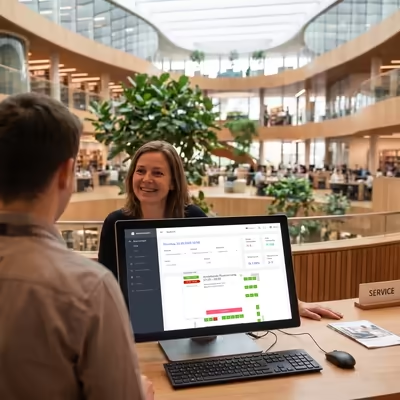
Service desk in a modern office or library building with reservation software displayed on a monitor and a customer consultation at the counter.

Backoffice

for easy administration

Optimized utilization, satisfied users

Why an online reservation system makes sense for your library

Benefits for Users

  • Book easily and quickly via app
  • Seat and time individually selectable
  • Guaranteed seat without waiting in line

Benefits for Libraries

  • Significantly better space utilization
  • Transparent real-time occupancy status
  • Simple communication of opening hours
  • Integrated, automated eligibility check
  • Sustainably higher user satisfaction

The smart platform for room management

The Features of Reserio

Reserio simplifies the management of complex room structures and creates a flexible, scalable solution for your reading rooms.

  • can manage multiple locations, reading rooms, floors
  • is multilingual; all texts can be translated into any number of languages
  • handles any room layout
  • can flexibly manage opening and closing times down to the individual workspace level
  • is freely configurable regarding booking duration, pause policies, etc.
  • is fully GDPR-compliant and meets the highest data protection standards
  • can be integrated with existing user management via web services

So funktioniert's

Ihr Weg zum Platz

Loading...

Reserve (Day, Time, Duration, Desk)

Manage reservations

Check-in, Check-out, Pause

Reservation as Wallet Ticket

Reminder via Push Notification

Updates via Live Activities

Try for free

Download the Reserio Demo App from the App Store and see for yourself.

This is a demo version for preview; your app will, of course, carry your name and logo.
To try the check-in function, please reserve table 481 and use to check in. Login is possible with any username/password combination.

Reserio App Icon

Can be administered from anywhere via web browser

Simple administration in the backoffice

User management for the backoffice with a role and permission concept

Quick overview of all reservations in the reading room

Users can be checked in and out manually

Statistics show occupancy and usage data

All texts translatable and adjustable

All parameters freely configurable

Reservations can be made and managed manually

Desks can be created independently and QR codes printed

Pricing

Simple, transparent models

Reserio QR

  • Booking and check-in via app
  • Administration via backoffice
  • Pure cloud operation, no hardware or software needs to be installed on-site
  • Check-in via QR code at your table
  • You can print out and attach the QR codes for the tables yourself
from 9.90€ per table/month*

* plus one-time set-up fee and statutory VAT.

Reserio ePaper

  • Booking and check-in via app
  • Administration via backoffice
  • On-premises installation in your data center
  • Check-in via code displayed on the ePaper
  • Installation of a special Access Point in the reading room
from 19.90€ per table/month**

** plus one-time set-up fee, cost per ePaper display and statutory VAT

Cover Library Forum Bavaria

Press Reports

"The ticket in the Wallet – or: How do I get to my preferred workspace?"

by Ronny Sternecker (Head of Information and Digital Services Department at the BSB)

"Exactly to the Day and Hour: a Booking App for Library Reading Rooms. The Example of the Bavarian State Library"

by Klaus Ceynowa (Director General BSB) and Berthold Gillitzer (Head of User Services Department BSB)

Frequently Asked Questions

FAQs

Do I need my own account in the App Stores?

To have your library listed as the publisher of the reservation app, you need a developer account in the Apple App Store and Google Play Store. If you don't have one yet, we'd be happy to help you set it up. Alternatively, we can publish the app under our account, which is faster and requires no effort on your part, though we will then be listed as the publisher.

Do I get my own app?

Yes, the reservation app is solely for your reading rooms and can carry a name defined by you.

Do I need to install any hardware or software on-site?

This is where Reserio.QR and Reserio.ePaper differ.

Reserio.QR is run entirely by us in the cloud; you do not need to install any hardware or software on-site. All you need is internet access and a web browser to manage the backend. In addition, the QR codes must be printed and pasted on the tables.

With Reserio.ePaper, hardware and software must be installed on-site. Beside the ePaper displays on the tables in the reading room, this includes an Access Point to control the displays, as well as the Reserio server software.

What is the advantage of the ePaper version?

The display on the ePaper panels shows on-site in the reading room where free tables are still located, making spontaneous bookings easy. In the QR code version, this information has to be checked inside the app.

We have multiple reading rooms in multiple buildings - can Reserio accommodate this?

Yes, Reserio can manage multiple reading rooms and locations. Parameters such as opening hours can be configured per reading room.

My reading room has multiple floors. What should I do?

No problem, Reserio can handle multiple floors. Users can switch between seating plans in the app.

Can I mark individual workplaces as "not bookable"?

Yes, that is possible. Workplaces can be blocked for days or even hours. They will then appear as occupied in the app.

How are closing days handled?

Closing days can be configured in the backend. If you have multiple locations or reading rooms, the closing days can vary by reading room.

What can I do if my opening hours change?

Simply change them in the backend. By the way, if you ever need to close your reading room earlier than usual for unforeseen reasons, you can send a push notification to all users who have a reservation on that day to inform them accordingly.

What happens to reservations that are not claimed (no-show reservations)?

Unfortunately, this happens, especially with free services. Reserio automatically cancels reservations that have not been claimed by a certain time (e.g., 15 minutes after the reservation starts) and releases the table. You can configure the wait time before cancellation in the backoffice. If desired, there is also an option for the user to extend the check-in window via an "I am running late" button.

Can the system only be used with an existing user account?

The system can be used completely without authentication, allowing anyone who downloaded the app to reserve, or it can require an account (i.e. login with username and password).

How is user management handled?

Reserio comes with its own user management in the backend. Users can register in the app, or they can be created in the backend. This allows the system to be used independently.

Can I integrate my existing user management?

This is likely the most common case. Reserio provides an authentication interface that existing user management systems or single sign-on systems can authenticate against.

How many reservations can a user make?

The number of reservations per user can be freely configured in the backend.

In which languages is the system available?

Currently in German and English, but all texts can be translated in the backend, so adding another language is not a problem.

How long does it take to set up the system?

This depends on the version: Reserio.QR is ready for use in about 3 days. For the ePaper version, we estimate 3-4 weeks since hardware must be installed.

How are the ePaper displays powered?

The ePaper displays are powered by an internal button cell battery, which needs to be replaced approximately every 3 years.

What do the ePaper displays show?

The ePaper displays show the status of the workplace: vacant (in white) or occupied (in red), or the start of the next reservation.

How are the ePaper displays mounted at the workplace?

This varies individually depending on your workplace and other architectural conditions. They have an adapter plate on the back which makes them easy to mount.

Do I need my own web server?

With Reserio.QR, no. Everything runs in the cloud, and no hardware or software needs to be installed in your library. With Reserio.ePaper, an Access Point to supply the ePaper displays must be installed in the reading room, along with a server for the Reserio application.

Do users need internet access?

Yes, they do. It doesn't need to be fast, but the app won't work without internet. It doesn't have to be Wi-Fi; normal mobile internet, which users have anyway, is completely sufficient.

Why does the app ask for permission to access the location?

To prevent misuse, we want to ensure that users are actually in the library when checking in. The same applies to returning from pauses, etc.

What happens if users arrive late?

The workplace is held for them for a certain amount of time; the duration can be configured in the backoffice. Additionally, Reserio allows users to report via the app while on their way that they are running late, which extends the check-in window.

Can I customize the texts individually?

All app texts and push notification texts can be customized individually in the backoffice.

From how many desks can the system be operated?

Reserio.QR can be operated starting from 20 tables, Reserio.ePaper from 100.

How long is the commitment, and what is the cancellation period?

You subscribe to Reserio for 12 months, after which it can be cancelled monthly.

"The reading room reservation app has served us well, especially during the times of restricted access to the library during the pandemic. It was well received by our users, particularly by tech-savvy clients who appreciated the predictability of their reading room visits with concrete reservation times."

Dr. Berthold Gillitzer
Head of User Services Department, Bavarian State Library
Dr. Berthold Gillitzer

Contact Us

Do you have any questions or would you like to schedule a demo?
We look forward to your message.

Book a Demo Slot

Schedule an Online Demo

Get to know Reserio

Simply select a date and time – we look forward to a personal conversation.

Duration
60 Minutes
Location
Microsoft Teams

Disclaimer

Reserio is a product of Bokowsky + Laymann GmbH, which is also the provider of this website.

Bokowsky + Laymann GmbH
Marketing in Computer-Mediated Environments
Herzogstr. 63
80803 München

Phone: +49 89 33 00 869-0
Fax: +49 89 33 00 869-9

Email: info@bokowsky.de

Website: http://www.bokowsky.de

Managing Directors:

Markus Bokowsky (markus@bokowsky.de)
Markus Laymann (laymann@bokowsky.de)

Association Register:

Munich District Court
HRB 122606

Value added tax ID number:

DE 197627811

Responsible pursuant to § 18 Medienstaatsvertrag (MSTV):

Markus Laymann

Privacy Policy

Data Protection Declaration

1. Name and Address of the Controller

The data controller within the meaning of the General Data Protection Regulation, other data protection laws applicable in the Member States of the European Union, and other provisions relating to data protection is:

Bokowsky + Laymann GmbH

represented by:
Markus Laymann
Managing Director
Herzogstr. 63
D-80803 Munich

2. Collection and storage of personal data, as well as the nature and purpose of their use

a) When visiting the website

When you visit our website, the browser on your device automatically sends information to our website’s server. This information is temporarily stored in a so-called log file. The following information is collected without any action on your part and stored until it is automatically deleted:

  • IP address of the requesting computer
  • Date and time of access
  • Name and URL of the file accessed
  • Website from which access is originated (referrer URL)
  • Browser used and, if applicable, your computer’s operating system, as well as the name of your internet service provider

We process the aforementioned data for the following purposes:

  • Ensuring a smooth connection to the website
  • Ensuring a user-friendly experience on our website
  • Evaluating system security and stability, as well as
  • for other administrative purposes.

The legal basis for data processing is Art. 6(1)(f) of the GDPR. Our legitimate interest arises from the purposes listed above for data collection. Under no circumstances do we use the collected data for the purpose of drawing conclusions about your identity.

b) When using the appointment form

To schedule a demo appointment, we offer you the option to contact us via a form provided on the website. You are required to provide your name, company name, and a valid email address. We need this information to identify the source of the inquiry and to respond to it. Additional information may be provided voluntarily.

Data processing for the purpose of contacting us is carried out in accordance with Art. 6(1)(a) GDPR on the basis of your voluntary consent. The personal data we collect when you use the contact form will be automatically deleted once your request has been processed.

3. Disclosure of Data

Your personal data will not be transferred to third parties for purposes other than those listed below. We will only disclose your personal data to third parties if:

  • You have given your explicit consent pursuant to Art. 6(1)(a) GDPR,
  • the disclosure is necessary pursuant to Article 6(1)(f) of the GDPR for the establishment, exercise, or defense of legal claims, and there is no reason to assume that you have an overriding legitimate interest in the non-disclosure of your data,
  • in the case that there is a legal obligation for the disclosure pursuant to Article 6(1)(c) of the GDPR, and
  • this is legally permissible and necessary pursuant to Article 6(1)(b) of the GDPR for the performance of contractual relationships with you.

4. Data Subject Rights

You have the right to:

  • pursuant to Article 15 of the GDPR, to request information about your personal data that we process. In particular, you may request information regarding the purposes of processing, the categories of personal data, the categories of recipients to whom your data has been or will be disclosed, the planned retention period, the existence of a right to rectification, erasure, restriction of processing, or objection, the existence of a right to lodge a complaint, the origin of your data if it was not collected by us, as well as information regarding the existence of automated decision-making, including profiling, and, where applicable, meaningful information regarding its details;
  • pursuant to Article 16 of the GDPR, to request the immediate correction of inaccurate personal data or the completion of your personal data stored by us;
  • pursuant to Art. 17 GDPR, to request the erasure of your personal data stored by us, unless processing is necessary for the exercise of the right to freedom of expression and information, for compliance with a legal obligation, for reasons of public interest, or for the establishment, exercise, or defense of legal claims;
  • pursuant to Article 18 of the GDPR, to request the restriction of the processing of your personal data if you contest the accuracy of the data, if the processing is unlawful, but you oppose its erasure and we no longer need the data, but you need it to assert, exercise, or defend legal claims, or you have objected to the processing pursuant to Article 21 of the GDPR;
  • pursuant to Article 20 of the GDPR, to receive the personal data you have provided to us in a structured, commonly used, and machine-readable format, or to request that it be transferred to another controller;
  • In accordance with Article 7(3) of the GDPR, you may withdraw your consent at any time by notifying us. As a result, we may no longer continue processing the data that was based on this consent in the future, and
  • pursuant to Article 77 of the GDPR, to lodge a complaint with a supervisory authority. As a general rule, you may contact the supervisory authority in your usual place of residence or workplace, or where our firm is headquartered
  • to object to the processing of your personal data pursuant to Article 21 of the GDPR, provided there are grounds for doing so arising from your particular situation or the objection relates to direct marketing. In the latter case, you have a general right to object, which we will honor without requiring you to specify a particular situation. You have the option to inform us of your objection informally by telephone, email, fax, or by mailing a letter to our law firm’s postal address listed at the beginning of this privacy policy.

5. Status and updates to this privacy policy

This Privacy Policy is effective as of April 16, 2026. We reserve the right to update the Privacy Policy from time to time to improve and/or adapt our data protection practices.

Check-In QR Code

Scan this code in the demo app to simulate checking in at desk 481.

QR Code Desk 481

Desk 481